
Public service communication works best when each channel helps people find an answer or complete a task. Residents need timely, reliable information, and staff need a way to handle recurring questions without answering them manually across every channel. The right govtech communication tools connect these needs through a clear service journey.
When comparing tools, look beyond feature lists. Consider who will use each channel, what information it draws on, how it supports accessibility, and what happens when a question needs staff attention. This checklist covers practical ways to assess web chatbots and text messaging, plan for live-agent handoff, and match channels to agency workflows.
Key Takeaways
- Match govtech communication tools to the task residents need to complete, rather than treating every channel as interchangeable.
- Use a repeatable checklist to assess audience access, accessibility, language needs, information sources, staff ownership, and workflow fit.
- Compare web chatbots and text messaging based on how people access information and how each channel connects to staff support.
- TextGov’s single platform delivers Court Chatbot, Government Chatbot, and Court Text Messaging. Court Text Messaging sends messages directly to users’ phones with no app, no login, and no browser required.
GovTech Communication Tools: Map Channels to Public-Service Needs
Govtech communication tools help agencies share information, guide people through services, and respond to questions. Think of them as parts of a service journey, not a collection of separate channels. Someone might visit an agency website to find a service, use a chatbot to understand the next administrative step, and receive a text reminder related to that service.
This practical view aligns with What is Civic Technology?, which describes technology’s role in improving communication and service delivery between people and government. The useful question is not which channel has the longest feature list, but which channel fits each task.
Match each communication channel to a public-service task
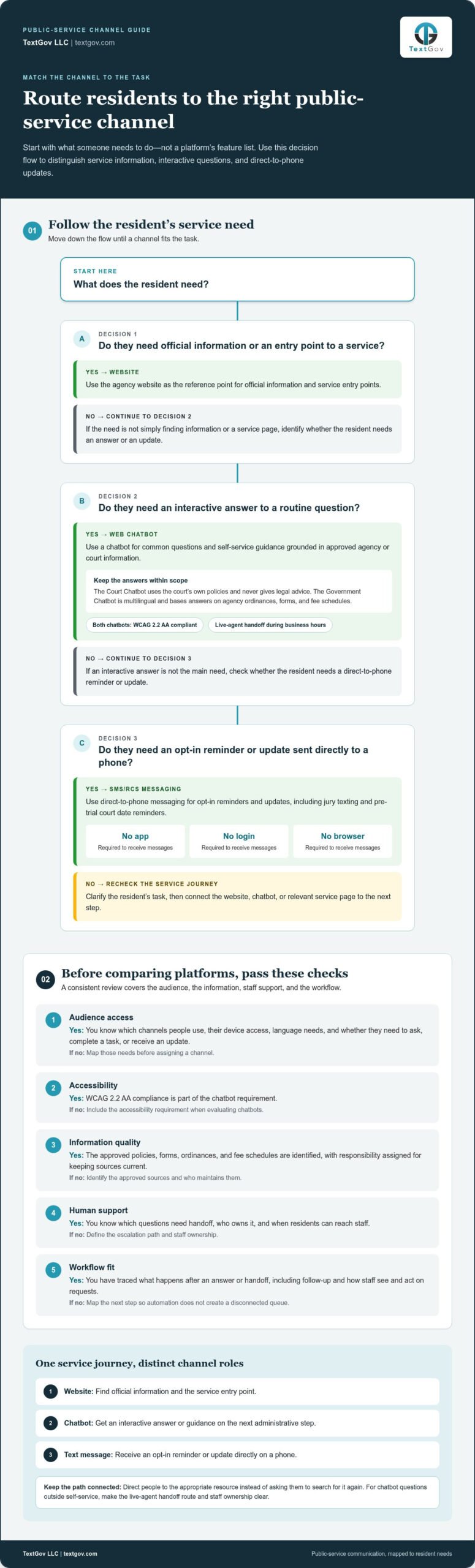
Begin by listing the questions and tasks residents bring to your agency. Then assign each channel a clear role. A website can provide official information and entry points to services. A web chatbot can answer common questions interactively. SMS/RCS messaging can deliver direct-to-phone communications, including opt-in reminders and updates.
- Routine questions: Use a chatbot for self-service answers based on approved agency or court information. TextGov’s chatbots are WCAG 2.2 AA compliant. The Government Chatbot is multilingual and answers based on the agency’s own ordinances, forms, and fee schedules.
- Reminders and updates: Use direct-to-phone messaging when people need an opt-in reminder or update. Court Text Messaging delivers messages directly to users’ phones with no app, no login, and no browser required. Its uses include jury texting and pre-trial court date reminders.
- Service navigation: Keep the agency website as a reference point, then direct people to a chatbot for questions or to the relevant service page for the next step. Use a message to point to the appropriate resource rather than sending people to search for it again.
Set clear boundaries for every channel. The Court Chatbot is grounded in the court’s own policies and never gives legal advice. When self-service does not address a question, both chatbots offer live-agent handoff during business hours. For more on handling recurring questions, explore this government chatbot FAQ guide.
A GovTech Communication Tools Checklist for Agency Decision-Makers
Compare govtech communication tools against real service needs, not feature lists alone. Before reviewing platforms, write down who needs information, what they need to do, and which approved sources can support a reliable answer. The World Bank on GovTech highlights the role of digital technology in improving public-sector services. For an agency, that means considering how a tool fits the work staff already do and the service residents need to complete.
Use this checklist to make comparisons consistent:
- Audience access: Identify the channels people use, their device access, language needs, and whether they need to ask questions, complete a task, or receive an update.
- Accessibility: Make WCAG 2.2 AA compliance a chatbot requirement. TextGov’s Court Chatbot and Government Chatbot are WCAG 2.2 AA compliant.
- Information quality: Name the current, approved policies, forms, ordinances, and fee schedules that should inform automated answers. Assign responsibility for keeping those sources current.
- Human support: Decide which questions should be handed off, who owns the handoff, and when residents can reach staff. Both TextGov chatbots offer live-agent handoff during business hours.
- Workflow fit: Trace what happens after a question is answered or handed off. Identify who handles follow-up and how staff can see and act on requests, so automation does not create a disconnected queue.
Evaluate accessibility, safeguards, and human support
Define what an automated response can and cannot do. The Court Chatbot draws on the court’s own policies and never gives legal advice. The Government Chatbot grounds its answers in agency ordinances, forms, and fee schedules, rather than presenting them as legal guidance. Set an escalation path for questions outside the chatbot’s scope and make staff ownership clear.
Choose measures that correspond to the service goal before evaluating platforms. Track the volume and types of questions to understand demand. Define what counts as a completed task, then review whether people reach the intended next step or need staff assistance. Look for repeated questions and handoffs that may indicate a gap in the information or workflow. Agencies planning a connected service approach can also explore TextGov’s public-sector communication platform.
Connect GovTech Communication Tools in One Public-Sector Platform
Agencies can connect self-service and direct-to-phone communication while giving each channel a distinct job. TextGov’s one platform delivers three services: Court Chatbot, Government Chatbot, and Court Text Messaging. The web chatbots answer questions and guide people through court or agency information. Text messages reach users directly on their phones for workflows such as opt-in jury texting and pre-trial court date reminders.
See how distinct messaging services support agency workflows
The Court Chatbot acts as a 24/7 virtual clerk, using the court’s own policies to answer questions. It never gives legal advice. The Government Chatbot is multilingual and bases answers on agency ordinances, forms, and fee schedules. Both chatbots are WCAG 2.2 AA compliant and offer live-agent handoff during business hours, so people have a route to staff when self-service is not enough.
Court Text Messaging uses SMS/RCS to communicate directly with users. Messages arrive on their phones with no app, no login, and no browser required. Court Text Messaging is A2P 10DLC registered, TCPA-aware. These features support direct-to-phone workflows such as jury texting and pre-trial reminders.
Technology stack matters when mapping tools to agency workflows. Twilio does not power TextGov’s web chatbots. Those run on the ChatBot + LiveChat + HelpDesk stack. Court Text Messaging and web chatbots are distinct services, so agencies can match the channel to the interaction rather than treating all messaging as the same experience.
To see how these services fit together, explore TextGov communication tools and consider which resident tasks your agency wants to make easier.
Build a More Connected Public Service
Turn channel choices into a service journey people can follow. Start with one defined workflow, such as answering a recurring question or sending a reminder. Identify the information source, the staff member responsible for follow-up, and the next step residents should take. Then review question volume, task completion, and handoffs to find where the experience needs improvement.
TextGov brings Court Chatbot, Government Chatbot, and Court Text Messaging together in one platform. The chatbots are WCAG 2.2 AA compliant and offer live-agent handoff during business hours. Court Text Messaging is A2P 10DLC registered, TCPA-aware, and delivers messages directly to phones with no app, no login, and no browser required.
Build your agency’s communication plan around the tasks residents need to complete and the channels that best support them.
Frequently Asked Questions
What is the difference between GovTech communication tools and an agency website?
An agency website is a destination for official information and services. Communication tools add interaction that helps people find or act on that information. For example, someone might use a website to locate a permit page, then use a chatbot to find the relevant agency information or understand an administrative step. Keep the website as a reference point and use each tool to make information easier to navigate.
Can agencies use multiple communication channels without confusing the public?
Yes, when each channel has a defined role and the guidance stays consistent. Explain what each channel is for, direct people to the right service or next step, and keep the agency website as a reference point. A notification can link people to a relevant page, while a chatbot can handle routine questions and offer a live-agent handoff during business hours.
How can an agency measure whether its communication tools are working?
Start with the service outcome and decide what counts as completion. Review whether people reach that step, return with the same question, or need staff assistance. Compare the types of questions and handoffs across channels, and look for points where people stop or need more help. These patterns can show whether information, routing, or the workflow needs attention.
Are GovTech communication tools useful for agencies with different service needs?
Yes. Choose tools based on the task, audience, and trusted information source. A court workflow may focus on administrative information, while a government department may guide residents through a service request. Define the intended outcome and staff process for each use case, then select capabilities that support it without forcing unrelated tasks into one channel. Explore TextGov’s public-sector communication platform to plan a connected approach for your agency.