
Citizen service improves when people can reach government information easily, trust that their personal details are protected, and get routine questions answered without unnecessary delays. Modern 311 platforms can give residents access to government services 24/7, making digital access an important part of how agencies improve citizen service.
Residents expect clear, convenient interactions, while public teams need tools that support efficient, dependable service. Meeting both needs takes more than putting forms online: agencies should consider the full citizen journey and build safeguards into digital experiences.
This article explores practical ways to improve citizen service in government, from making services easier to access across devices to protecting personal information and automating routine tasks. Learn how journey mapping, secure digital channels, and carefully managed automation can smooth residents’ experiences while supporting public employees.
Key Takeaways
- Map the resident journey across service channels to identify friction points and prioritize digital improvements.
- Make online services easier to access across devices while building privacy and security into the experience.
- Use AI and language technologies to handle repetitive service tasks and give staff more time for complex needs.
- Match digital tools to the service: a court chatbot can support residents seeking answers to routine court questions.
1. Access to services anytime and on any device
Modern 311 platforms can give residents access to government services 24/7, including outside office hours. Agencies can support phones, tablets, and computers with clear navigation, fewer duplicate form fields, and consistent instructions. For example, residents reporting a pothole can submit a location and photo, helping crews identify the issue and plan dispatch.
For accessible government services in the United States, agencies should account for applicable federal and state requirements and recognized digital accessibility standards. Include accessibility review in procurement, page design, and testing, with keyboard navigation, screen-reader compatibility, captions, and clearly labeled forms. To support multilingual service, identify commonly needed languages and translate essential instructions, service pages, and contact options.
There is no single modernization cost. The price depends on the project and is provided after a quote request; key factors include legacy systems, integrations, data cleanup, security controls, accessibility work, and staff training.
Responsive websites, online forms, integrated contact-center systems, and chat tools can improve service delivery. A Government Chatbot can help answer routine questions, while a mobile-friendly 311 form can collect the details departments need to route a request efficiently.
To improve 311, connect phone, chat, and social media requests so staff can manage them without isolated systems. Predefined routing rules can direct service tickets to the right department. For remote agents, secure service edge technology can apply consistent security policies across on-site and remote contact-center work, supporting access while protecting agency systems.
2. Protecting citizens’ personal information
A privacy-first citizen experience starts with collecting only information needed to complete a service. Agencies can restrict staff access by role, protect stored and transmitted data, and define retention practices. For example, a recreation registration page may need contact details, but should avoid requesting unrelated personal information.
NIST standards provide a framework for federal agencies and programs requiring stringent security measures. During the 2026 IRS filing season, approximately 60,000 records were put at risk. The issue was resolved with zero external taxpayer impact. This example highlights why agencies need clear incident procedures, access controls, and communication plans.
A well-organized government website can make relevant services easier to find without exposing sensitive details. Organize pages around tasks, use plain-language labels, and tailor content to a selected service or location rather than inferred personal traits. Assess service quality through short post-interaction surveys, task completion, repeat contacts, and unresolved requests. Together, these measures show whether a platform meets expectations and where the experience needs improvement.
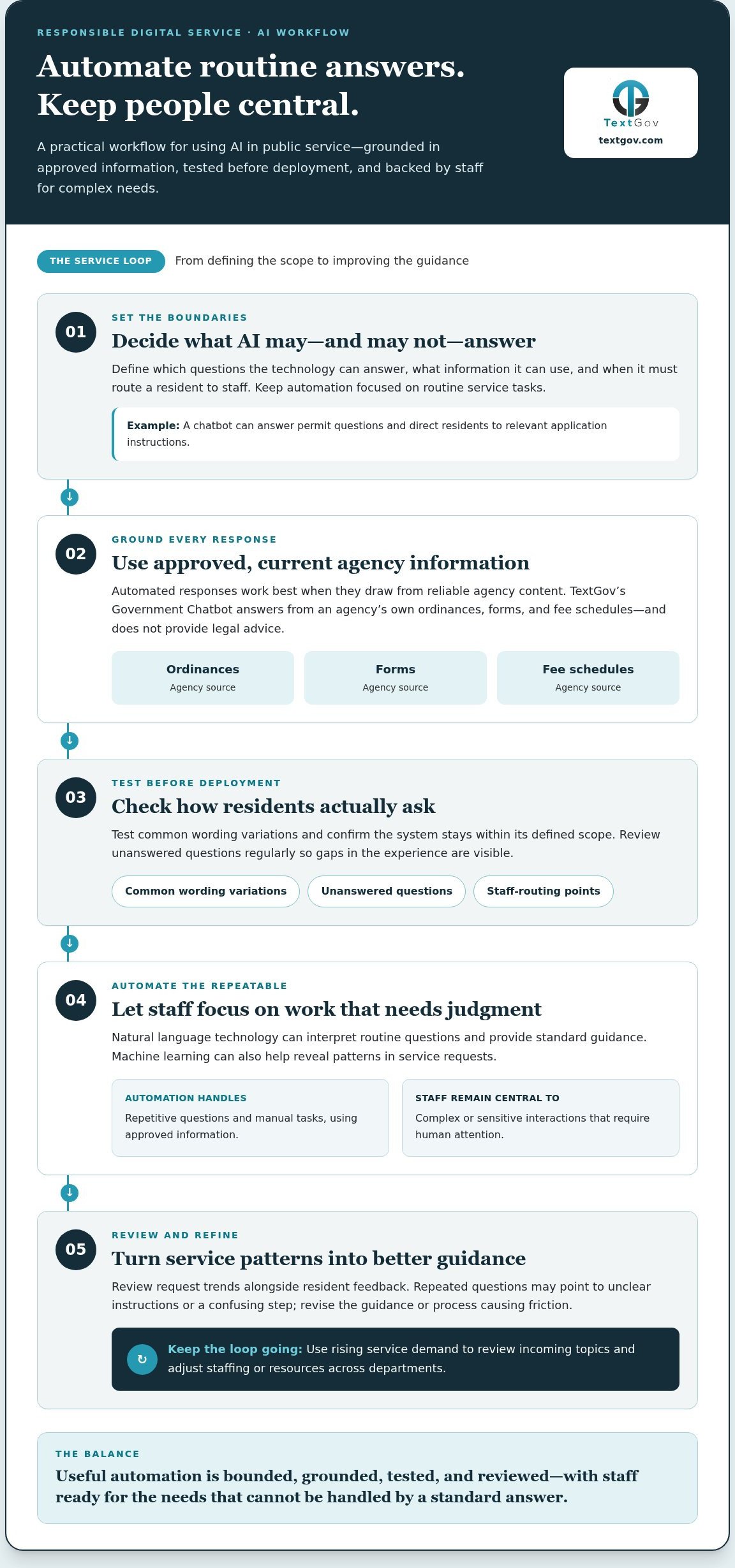
AI can streamline routine interactions, giving agency employees more time for complex requests. For example, a chatbot can answer questions about permits and direct residents to relevant application instructions. Automated responses work best when grounded in approved, current agency information. TextGov’s Government Chatbot answers from an agency’s own ordinances, forms, and fee schedules, without providing legal advice.
3. AI, machine learning, and natural language technologies
AI can streamline routine interactions, giving agency employees more time for complex requests. For example, natural language technology can interpret a resident’s question about a permit and direct them to relevant application instructions. Automated responses work best when they draw from approved, current agency information.
Machine learning can help agencies spot patterns in service requests. For instance, recurring questions about a benefits application may signal unclear instructions or a confusing step. Review those trends alongside resident feedback, then revise the guidance or process causing friction. Staff can focus on cases requiring judgment instead of repeating standard explanations.
Use request trends to understand demand, adjust staffing, and shift resources across departments. If questions about a service rise, managers can review incoming topics and allocate support accordingly. Automation can handle repetitive manual tasks, while staff remain responsible for complex or sensitive interactions. This balance supports efficient service without treating every resident’s situation as identical.
Before deployment, define which questions the technology may answer, what information it can use, and when it should route a resident to staff. Test common wording variations and regularly review unanswered questions. These steps help keep automated guidance useful, accurate, and aligned with the agency’s service mission.
Before deployment, define which questions the technology may answer, which information it can use, and when it should route a resident to staff. Test common wording variations and review unanswered questions regularly. These steps help keep automated guidance useful, accurate, and aligned with the agency’s service mission.
TextGov: Court Chatbot
TextGov’s Court Chatbot is a practical option for courts seeking to make routine public information easier to access. Consider it when residents frequently need help finding court information, and staff receive repeated inquiries that take time away from other work. A chatbot can support digital service delivery and help reduce call volumes, while court employees remain central to complex or sensitive matters.
For broader municipal needs, TextGov also offers a Government Chatbot, while Jury Texting supports communication with jurors. The right tool depends on the audience and service workflow your agency wants to improve. Map common questions and identify where residents need clearer digital guidance, then consider which offering aligns with that need.
Contact TextGov to discuss digital service options for your agency.
Build the Next Generation of Public Service
TextGov’s single platform delivers three distinct services: Court Chatbot, Government Chatbot, and Court Text Messaging. They support courts and agencies managing recurring public questions and communication needs. Start with the service challenge, then choose the channel that fits the audience and workflow.
TextGov offers a Court Chatbot, a Government Chatbot, and Jury Texting. These options can support agencies addressing recurring public questions or communication needs tied to court and government services. Choose the service challenge first, then consider which digital channel fits the audience and workflow.
Each well-designed interaction can make public services clearer and easier to use. Your next improvement can begin with one purposeful step.
Frequently Asked Questions
What are the best ways to improve citizen services in government?
Design around residents’ goals rather than agency org charts. Use plain language, explain unfamiliar terms, and show required documents before a form begins. Test a draft service with people who have different levels of digital confidence, then revise confusing steps. Provide a clear route to human assistance when a resident’s situation falls outside the standard process.
What are best practices for designing citizen-centered government services?
Design around residents’ goals rather than agency org charts. Use plain language, explain unfamiliar terms, and show required documents before a form begins. Test a draft service with people who have different levels of digital confidence, then revise confusing steps. A strong design also provides a clear route to human assistance when a resident’s situation falls outside the standard process.
How can government agencies improve services for people with disabilities and limited English proficiency?
Common risks include collecting unnecessary personal data, granting excessive staff access, retaining records longer than needed, and exposing information through poorly managed vendor integrations. Agencies should inventory data flows, limit permissions by role, and define incident-response responsibilities. NIST provides a security framework for federal agencies and programs requiring stringent measures; local agencies can use structured controls suited to their operations.
What privacy, cybersecurity, and compliance risks affect digital government services?
Collect feedback at useful moments, such as after a permit decision or a completed service request, and provide options beyond online surveys. Categorize comments by task and issue, then compare recurring concerns with call-center questions and support tickets. Share findings with the responsible team, assign an action, and communicate service changes so residents can see how their input shaped improvements.
How can government agencies gather and use citizen feedback?
Collect feedback at useful moments, such as after a permit decision or a completed service request, and provide options beyond online surveys. Categorize comments by task and issue, then compare recurring concerns with call-center questions and support tickets. Share findings with the responsible team, assign an action, and communicate service changes so residents can see how their input shaped improvements.