
Local government service shouldn’t stop when the office closes. A citizen self-service chatbot can help residents find information and access services around the clock, including in dozens of languages. That makes support more available when people need it, not only during office hours.
Residents expect digital services to be easy to access and straightforward to use. This article explains how always-on, multilingual chatbot support can meet those expectations, which local government services it can handle, and how it can streamline routine inquiries while helping staff focus on more complex needs.
Key Takeaways
- Map the questions residents ask most often to find where digital self-service can make access easier.
- Prioritize clear, accessible interactions so more residents can use local services independently.
- Identify routine requests a chatbot can route to the right system, while preserving staff support for more complex needs.
- Consider how digital service options can reshape existing workflows, including inspection requests and other common tasks.
24/7 Support and multilingual accessibility
Municipal self-service portals can let residents access services 24/7, including when counters and phone lines are closed. A citizen self-service chatbot can guide residents through applications, explain which documents are needed, or direct them to permit information. Public service needs continue beyond 5 p.m., so residents may need guidance outside office hours. An after-hours interaction can help someone identify a next step without waiting for the office to reopen.
Language access is an important part of public service. A government chatbot should be multilingual, making it easier for residents to seek information in a language they understand. Make language selection easy to find, and keep guidance consistent across tasks such as permits and public services. Accessibility matters, too: use clear labels, readable text, and interactions that work with assistive technology. A chatbot should also offer a path to human assistance when an automated response cannot resolve an issue.
Specific workflow details matter as much as language options. The City of North Las Vegas recommends setting up an additional authentication method for enhanced account security. For a CSS planning application, Applicant and Owner are required contacts. Applicants must complete all fields marked with an asterisk in the More Info section. They should attach a document for each required tile and can upload additional documents. A chatbot can help residents find these instructions before submitting an application.
Keep guidance practical and task-based. Explain which documents belong with a permit request, where to find application instructions, and what to do when a required field is incomplete. Reducing municipal administrative work in increments of five or 10 minutes can add up to a significant decrease in staff time spent on phone calls and counter visits. Review recurring questions and update chatbot responses when procedures change, so residents receive relevant guidance around the clock.
Changing expectations for digital local government services
Residents expect digital channels to make routine tasks easier, not add another disconnected step. A chatbot can complement existing services when its role and handoffs are clearly defined.
Service Scope and Channel Comparisons
A chatbot answers conversational questions; a virtual agent may describe similar automated support. A 311 call center handles requests through staff, while a service portal organizes forms and transactions. The right comparison is which channel helps residents complete each task. Integration can connect chatbot conversations with 311, permitting, payments, or case management, depending on system capabilities. The price depends on the case and is given after a quote request; scope, integrations, customization, and ongoing support affect cost.
Privacy, Security, and Data Retention
Privacy, security, and record retention depend on the information collected and the agency’s policies. Define what conversations may capture, who can access them, and how long records are kept. Collect only the details needed for the task, protect access, and establish deletion or archival procedures. Explain these practices before residents share personal information, and provide another channel for sensitive matters.
Planning, Launch, and Ongoing Maintenance
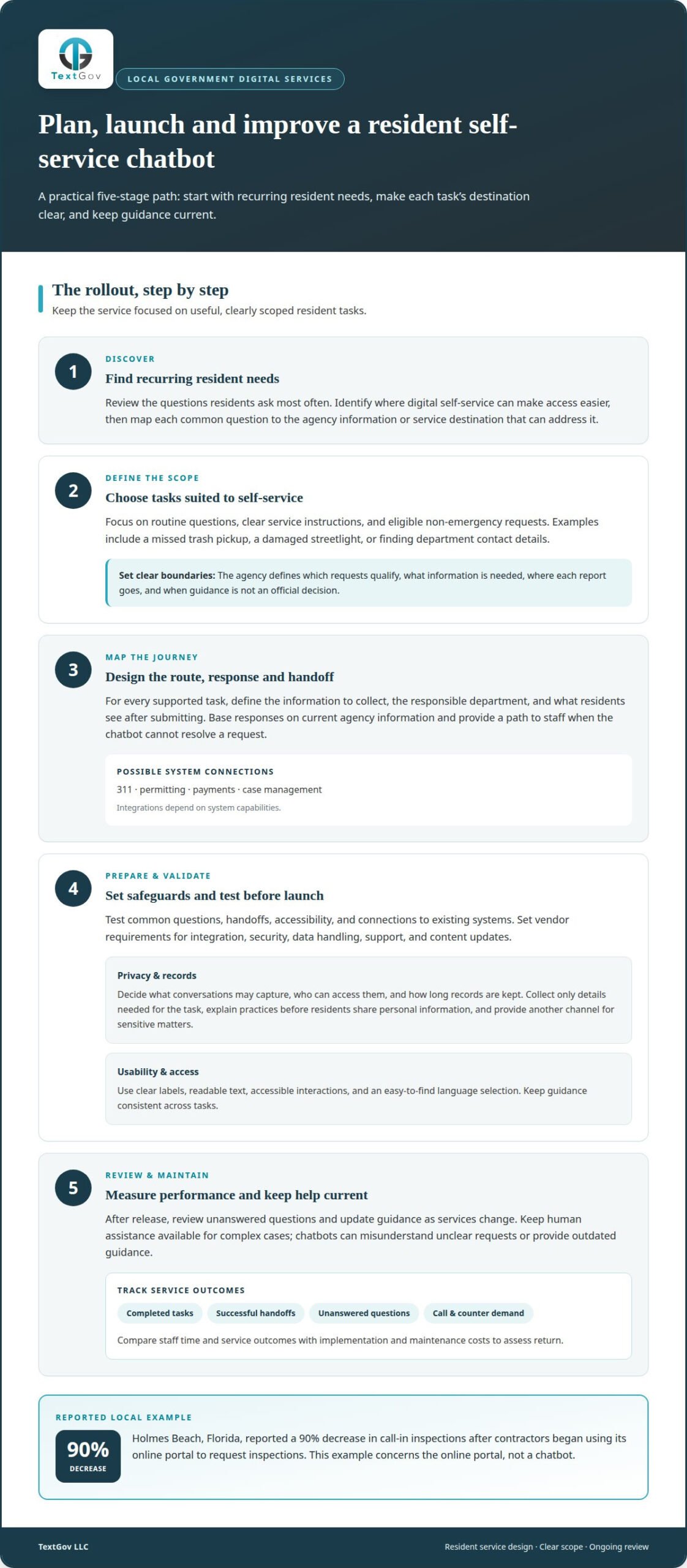
Start by identifying recurring resident needs, then select tasks suited to guided self-service. Map responses to current agency information and decide where unresolved requests go. Before launch, test common questions, handoffs, accessibility, and connections to existing systems. Set vendor requirements around integration, security, data handling, support, and content updates. After release, review unanswered questions and revise guidance as services change. For a practical next step, explore government chatbot support.
Effectiveness, Returns, Risks, and Limitations
Measure completed tasks, successful handoffs, unanswered questions, and changes in call or counter demand. Compare staff time and service outcomes with implementation and maintenance costs to assess return. Holmes Beach, Florida, reported a 90% decrease in call-in inspections after contractors began using its online portal to request inspections. Chatbots can still misunderstand unclear requests or provide outdated guidance. Keep human assistance available for complex cases, and review performance regularly.
What services can a government citizen self-service chatbot handle?
A citizen self-service chatbot can guide residents through routine questions and eligible service requests. For example, someone reporting a missed trash pickup can describe the issue, get relevant instructions, and submit a non-emergency request. A municipal chatbot can log non-emergency requests in the appropriate system. The agency defines which requests qualify and where each report should go.
The most useful tasks depend on local services and residents’ needs. A citizen self-service chatbot can organize common questions into clear paths, helping people reach the right department or understand what to do next. Examples include reporting a damaged streetlight, finding department contact details, or learning what information a service request requires. Clear boundaries help residents distinguish general guidance from an official decision.
- Find information: Direct residents to department guidance, contact details, or service instructions.
- Start a request: Gather details for eligible non-emergency reports and route them to the appropriate system.
- Clarify next steps: Explain what happens after submission using the agency’s approved information.
- Escalate complex needs: Direct requests requiring staff judgment to an appropriate human channel.
Before launch, map each supported task from the resident’s first question to its destination. Define the information needed, the responsible department, and the response shown after submission. For example, a streetlight report needs a location and issue description to help staff identify the request. Keep guidance current, and tell residents when the chatbot cannot complete a task. A clearly scoped citizen self-service chatbot gives residents a practical route to assistance and helps agencies provide useful, consistent service.
TextGov
TextGov helps courts and government agencies improve public service through chatbot and text messaging solutions. For local governments planning a citizen self-service chatbot, its Government Chatbot can support resident inquiries and routine service needs, helping streamline communication and reduce call volumes. Courts can use the Court Chatbot for public-facing support, while Jury Texting supports juror communications.
Consider TextGov when your agency wants to make routine information easier to access and give staff more room to handle complex requests. Discuss your service priorities, the questions residents ask, and how a chatbot could fit existing workflows. Contact TextGov to talk through your agency’s needs.
Make digital service part of the next step
Move from the idea of a chatbot to a clear service objective. Choose a resident need, define who owns its information, and decide how the interaction should connect with existing workflows. A focused starting point gives your team a practical way to shape, review, and improve the experience over time.
A citizen self-service chatbot works best when its role is clear to residents and staff alike. TextGov’s single platform delivers Government Chatbot, Court Chatbot, and Court Text Messaging, including jury texting and pre-trial reminders. Consider how these services align with your agency’s goals and the questions residents bring forward.
Thoughtful planning can make digital support a more deliberate part of local service delivery. Start with the priority that matters most to your agency.
Your next improvement can start with one well-defined resident need.
Frequently Asked Questions
What is a citizen self-service chatbot?
A citizen self-service chatbot lets residents ask questions and follow guided steps to find government information or services. Unlike a static webpage, it can respond conversationally and direct people to relevant agency resources. For example, a resident unsure which department handles a concern can describe it and receive suitable guidance. It supports access to information but does not replace staff judgment or official decisions.
What are examples of successful local government chatbots in the United States?
U.S. examples include Cook County Probate’s chatbot, which absorbed 64% of surge conversations, and Fulton County’s Clerkette and Maggie court chatbots. These deployments illustrate how public agencies can use conversational tools for resident or court-related inquiries. Success can be assessed by whether the system helps people reach useful information and whether staff can manage requests more effectively.
How can a citizen chatbot meet ADA accessibility and language access requirements?
Design the experience so residents can navigate prompts, understand responses, and access an alternative route when needed. TextGov’s chatbots are WCAG 2.2 AA compliant, and its Government Chatbot is multilingual. Agencies can also review common tasks with assistive technology and keep translated responses aligned with current agency information, helping residents use the service more independently.