
What if the message that helps someone remember a court date isn’t the same message that legally gives notice? That distinction matters. Electronic court notifications can make routine communication easier, but the channel alone doesn’t determine whether a message meets procedural requirements.
Courts need to match each communication to its purpose while accounting for missed messages, outdated contact details, accessibility, and public trust. This guide compares email, text messages, online portals, and chatbots, then explains how to build clear workflows around applicable court rules. It also covers how juror text reminders and court chatbots can support public-facing communication without blurring the line between a reminder and formal service.
Key Takeaways
- Match each communication to its purpose, and distinguish operational reminders from formal notice or service.
- Compare SMS, email, and portal alerts by urgency, message length, and how recipients access them.
- Build electronic court notifications around clear language, accurate contact details, privacy, accessibility, and court-specific procedures.
- Map communication workflows and establish oversight and escalation paths before introducing or expanding automation.
What Are Electronic Court Notifications, and When Are They Formal Notice?
Electronic court notifications are digital communications sent through channels such as email, text message, or an online court portal. Courts may use them to share practical information, prompt action, or deliver documents. A digital format alone, however, doesn’t establish that a message is formal notice or legally valid service. Its effect depends on the applicable federal, state, local, and court-specific rules, including requirements for the communication method and recipient consent.
How do reminders, alerts, and formal court notices differ?
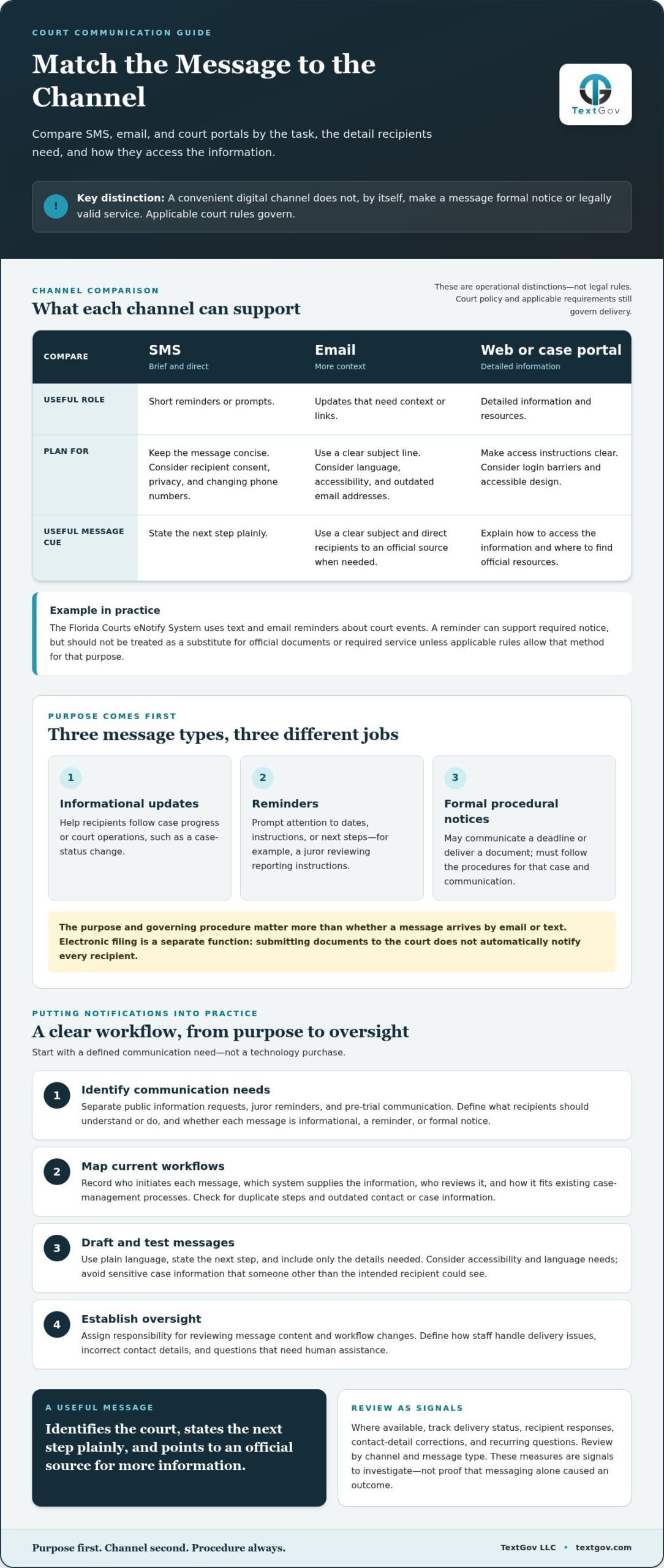
Start by identifying the purpose of each message. An informational alert might tell someone that a case status has changed. A reminder might prompt a juror to review reporting instructions or a party to remember a scheduled hearing. A formal procedural notice may communicate a deadline or deliver a document through a method required by court rules. The purpose and governing procedure matter more than whether the message arrives by email or text.
A reminder can support a required notice, but it doesn’t automatically replace it. For example, a courtesy text about a hearing should not be treated as a substitute for official documents or required service unless the applicable rules allow that method for that purpose.
Keep the distinction clear in court messaging workflows:
- Informational updates help recipients follow case progress or court operations.
- Reminders prompt attention to dates, instructions, or next steps.
- Formal notices must follow the procedures that apply to the specific case and communication.
Electronic filing serves a related but different function: it concerns submitting documents to the court, not automatically notifying every recipient. The overview of Electronic Court Filing (ECF) provides useful context for the distinction. Before relying on electronic court notifications as formal notice or service, follow the rules governing the relevant jurisdiction and court.
How Should Courts Compare Electronic Notification Channels?
Choose a channel by considering what recipients need to do, how quickly they need the information, and how much detail the message requires. SMS works well for brief prompts, while email and case portals can carry fuller explanations or direct people to official resources. These are operational distinctions, not legal rules. Court policy and applicable requirements still govern delivery.
Which channel fits each court communication task?
Begin with the task, then consider whether recipients can access the channel and what happens if they cannot. The Florida Courts eNotify System, for example, uses text and email reminders about court events. Comparing channel strengths helps courts plan electronic court notifications without treating a convenient reminder method as a replacement for required delivery procedures.
| Channel | Useful role | Operational considerations |
|---|---|---|
| SMS | Short reminders or prompts | Keep it concise; consider consent, privacy, and changing phone numbers. |
| Updates with context or links | Use clear subject lines; consider language, accessibility, and outdated addresses. | |
| Web or case portal | Detailed information and resources | Make access instructions clear; consider login barriers and accessible design. |
Before choosing a channel, ask what action the recipient should take and whether the message needs to include details or link to an official source. Consider reliable access, readability, and language support where available. Limit sensitive information, explain how to correct contact details, and define the staff process for an undelivered message. A useful message identifies the court, states the next step plainly, and directs the recipient to an official source for more information.
Courts can connect reminder workflows to operational tools such as TextGov’s court-focused messaging solutions, while keeping procedural requirements at the center.
How Can Courts Put Electronic Notifications Into Practice?
Reliable electronic court notifications begin with a defined communication purpose, not a technology purchase. A structured rollout helps courts improve public access while keeping responsibilities, procedures, and oversight clear.
- Identify communication needs. Separate public information requests, juror reminders, and pre-trial communication. For each type, define what recipients should understand or do and whether the message is informational, a reminder, or formal notice.
- Map current workflows. Record who initiates each message, which system provides its information, who reviews it, and how it fits existing case-management processes. Check where duplicate steps occur and where contact or case information could become outdated.
- Draft and test messages. Use plain language, state the next step, and include only details needed for the communication. Consider accessibility and language needs. Avoid sensitive case information that could be seen by someone other than the intended recipient.
- Establish oversight. Assign responsibility for reviewing message content and workflow changes. Define how staff handle delivery issues, incorrect contact details, and questions that need human assistance.
Track useful indicators such as delivery status where available, recipient responses, contact-detail corrections, and recurring questions. Review the results by channel and message type to identify where wording or workflow may need improvement. Treat the measures as signals to investigate, not proof that messaging alone caused a particular outcome.
Where can court messaging automation support the workflow?
A court chatbot can guide the public to relevant information and help answer common questions. TextGov provides court chatbots, government chatbots, juror text reminders, and pre-trial texting. Its platforms can be configured with automated workflows and custom messaging scripts, and connected to existing case-management systems. These tools support routine communication while court rules and approved procedures continue to govern required notice or service. For more on planning public-facing access, explore court chatbot software guidance alongside this court technology modernization framework.
Build the Next Generation of Court Communication
Modernization works best when it starts with a clear service goal. Use your electronic court notifications strategy to select a manageable workflow, define how you will assess it, and give staff a consistent process for reviewing and improving messages. A focused rollout lets teams learn from recipient and staff feedback while keeping communication dependable and aligned with court procedures.
There’s no need to change every channel at once. Start with a specific communication need, review what recipients and staff report, and use those insights to guide the next improvement. TextGov helps courts configure chatbots and messaging workflows around their operational needs, including integration with existing case-management systems.
Clear, accessible communication is a practical investment in public trust. Explore how TextGov’s court chatbot and messaging solutions can support your court’s communication workflows.
Frequently Asked Questions
Are electronic court notifications legally valid?
Sometimes, but validity depends on the governing rules, the type of communication, and the court’s procedures. A court should distinguish permission to send a digital message from whether that message satisfies a legal notice or service requirement. For electronic court notifications, staff can document the method used, destination, send time, and available delivery record, then follow the jurisdiction’s rules for the specific proceeding.
Can a court send case reminders by text message?
Yes, courts may use text messages for reminders when their policies and applicable rules allow it. For example, a message can prompt someone to review a hearing date or reporting instructions through an official court source. Keep the text brief and avoid unnecessary case details that could appear on a shared or visible phone. A reminder should not be treated as formal service unless the governing procedure permits it.
What should a court do when a recipient’s phone number or email changes?
Give recipients a clear, court-approved way to report updated contact information, such as the designated case update process or clerk’s office. Staff should follow applicable identity-check procedures, correct the authoritative record, and note when the change takes effect. Avoid relying only on a separate messaging contact list, which could remain out of sync with case records. A returned email or undelivered text is a signal to follow the court’s established process, not proof of a new address.
How can courts measure whether electronic notifications are working?
Set a baseline before expanding a program, then review results by channel and communication type. Alongside delivery and response data, examine related measures such as calls about the same instruction, staff time spent resolving confusion, and recipient feedback about message clarity. Compare like periods and groups where practical, and account for other changes in court operations. These measures can guide adjustments, but they don’t establish that messaging alone caused an outcome.